Understanding Mesh Wi-Fi Systems: How to Evaluate and Upgrade Your Home Network
Picture this highly relatable modern frustration: You have just settled into your bedroom or newly converted home office. You launch a critical video conference or queue up a high-definition movie, and suddenly, the dreaded buffering wheel appears. You check your phone, only to see a single, struggling Wi-Fi bar. Meanwhile, your internet service provider’s router is blinking happily in the living room, completely oblivious to the fact that its signal cannot penetrate the walls and corridors between you.
For years, the standard solution to this problem was a wireless range extender. Unfortunately, extenders often cut your bandwidth in half and force you to manually switch to a secondary network with a name like "HomeNetwork_EXT" every time you walk down the hall.
Enter the mesh Wi-Fi system. It is a technology that has transitioned from enterprise-level corporate offices to everyday living rooms, completely revolutionising how we connect. But with a saturated market full of confusing technical jargon, how do you know what you actually need? Here is a comprehensive guide to how mesh Wi-Fi works, how to evaluate a system, and practical tips to ensure wall-to-wall connectivity.
How a Mesh Wi-Fi System Actually Works
To understand a mesh network, it helps to use an analogy. A traditional single router is like a speaker playing music in your living room. If you are sitting on the couch, the music is loud and clear. If you walk upstairs and close the door, the sound becomes muffled and faint.
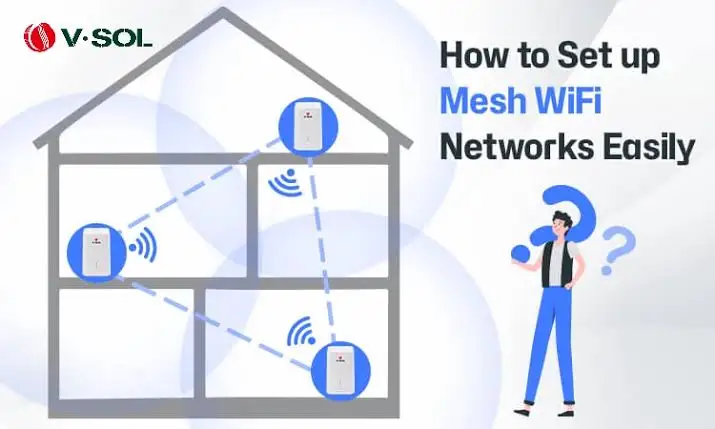
A mesh Wi-Fi system, on the other hand, is like a synchronised surround-sound system placed throughout your house. It consists of a primary router that connects directly to your modem, paired with several satellite modules (often called "nodes") placed in different rooms.
Instead of just broadcasting a signal from one point, these nodes communicate with each other dynamically. They form a seamless, invisible web—or "mesh"—of coverage. As you walk from your kitchen to your upstairs bedroom, your smartphone or laptop doesn't drop the connection to pick up a new one. The mesh system intelligently and instantly hands off your device to the node with the strongest signal. You remain on one network, with one password, without ever noticing the transition.
How to Evaluate and Choose the Right System
Because exact specifications, speeds, and square-footage claims vary wildly by manufacturer and specific model, you should avoid getting bogged down by marketing hype. Instead, evaluate a mesh system based on these core foundational criteria.
1. The Backhaul: Dual-Band vs. Tri-Band
The most critical factor in a mesh system's performance is how the nodes talk to one another, a process known as the "backhaul".
- Dual-Band Systems: These systems operate on two frequencies (typically 2.4 GHz and 5 GHz). The nodes must share these lanes with your devices. Because the nodes are talking to your devices and to each other on the same frequencies, you can experience a bottleneck in speed.
- Tri-Band and Quad-Band Systems: These systems feature an additional 5 GHz or 6 GHz band dedicated entirely to node-to-node communication. Think of this as a private, high-speed VIP highway just for the routers. If your household has dozens of smart devices, heavy 4K streaming, or multiple gamers, a system with a dedicated wireless backhaul is highly recommended to maintain top speeds.
2. Wi-Fi Standards (Wi-Fi 6, 6E, and 7)
Wireless standards dictate the theoretical speed and efficiency of the network. While exact speeds depend on your internet service provider, newer generations are built to handle high-density environments better. If you have an older system, upgrading to a modern standard like Wi-Fi 6 or beyond will drastically improve how the network handles multiple devices simultaneously. Ensure you check which generation the manufacturer supports, keeping in mind that your client devices (like phones and laptops) must also support these newer standards to reap the maximum benefits.
3. Node Count and Coverage Claims
Manufacturers often print estimated square-footage coverage on the box. It is vital to remember that these numbers are calculated in optimal, open-air laboratory conditions. In a real home, walls, appliances, and interference will reduce that range. Rather than buying a massive system upfront, a good strategy is to purchase a standard two- or three-node pack. Because mesh systems are modular, you can always evaluate the coverage and add a single expansion node later if a dead zone persists.
Common Issues and Limitations
While mesh networks are incredibly robust, they are not entirely immune to physics. Understanding their limitations will save you hours of troubleshooting.
The "Daisy Chain" Drop-off
If you place your nodes in a straight line extending far away from the main router (e.g., Node A talks to Node B, which talks to Node C), the internet speed can degrade by the time it reaches the final node. This is especially true on dual-band systems without a dedicated backhaul. Ideally, nodes should be placed in a star or hub-and-spoke formation around the main router whenever possible.
Over-Saturation
More nodes do not automatically equal better Wi-Fi. In fact, if you place too many nodes in a small space, they can create wireless interference with each other. Devices can become confused about which node to connect to, leading to dropped connections and slower speeds.
Architectural Interference
Wireless signals hate dense materials. Concrete walls, brick chimneys, metal ductwork, and even large mirrors or aquariums will severely degrade a Wi-Fi signal. If a node is placed behind a thick structural wall, it will struggle to communicate with the main router, rendering it ineffective.
Practical Tips for Optimal Setup
To get the absolute best performance out of whatever mesh system you choose, follow these deployment strategies:
1. Give Your Nodes "Line of Sight"
While you don't need a literal, uninterrupted line of sight between every node, you should place them out in the open. Do not hide your mesh nodes inside wooden TV cabinets, behind bookshelves, or on the floor. Placing them on a desk or shelf at waist-to-chest height allows the internal antennas to broadcast the signal more effectively.
2. Utilize Wired Backhaul
If your home is wired with Ethernet cables in the walls, you have a massive advantage. Most high-quality mesh nodes feature Ethernet ports. By physically plugging the satellite nodes into the wall, they can communicate with the main router via a physical wire rather than a wireless signal. This is known as a "wired backhaul" and guarantees the fastest, most stable speeds possible, completely bypassing wireless interference.
3. Centralize the Main Router
The node connected to your modem dictates the flow of the entire network. If your modem is located in the far corner of a basement, the mesh system has to work incredibly hard to push the signal to the opposite end of the second floor. If you have the ability to move your modem to a centralised location on the main floor, your mesh system will perform exponentially better.
A Seamless Digital Foundation
Your home network is the invisible foundation of your modern life. Whether you are running a smart home ecosystem, working remotely, or simply trying to stream a movie without interruption, a reliable connection is no longer a luxury—it is a necessity.
By upgrading from a single, struggling router to a dynamic mesh Wi-Fi system, you eradicate dead zones and create a seamless, unified web of connectivity. When evaluating your options, prioritise the quality of the backhaul, respect the physical architecture of your home during setup, and avoid the trap of buying more nodes than you actually need. With a thoughtful approach, you can build a robust network that quietly and efficiently supports your digital life.